
Overview
Use the skip link component to help keyboard and screen reader users bypass sections of repetitive content and quickly get to the main content of the page.
Example
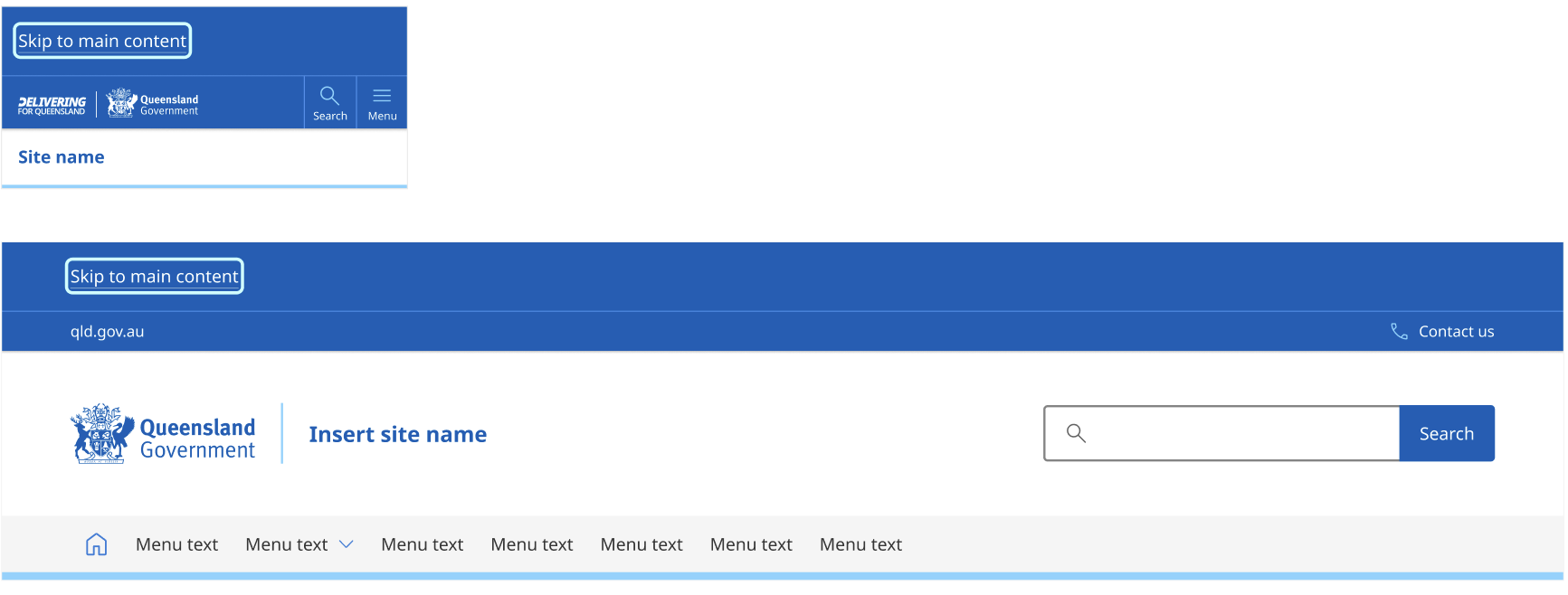
The code libraries below do not yet reflect the latest designs. We're currently updating them and will remove this notice once complete.
Usage guidelines
When to use
- To bypass repetitive blocks on a page.
- On all Queensland Government websites include a skip link that reads “Skip to main content”.
- On pages that have numerous utility links or functions above the main navigation, it may also be useful to provide a “Skip to main navigation” link. Place it after the “Skip to main content” link. Only one skip link appears at a time (when it has focus).
When not to use
- To link to content on other pages.
- To jump to content that is not a substantive region of the page.
How to use
- The skip link is a block-level element. Keep it visually hidden until it receives keyboard focus.
- Match the skip link's colour palette to the pre-header colour palette (choose from default, dark, or dark-alt).
- Place the skip link immediately after the opening
<body>tag. However, if a global alert is present, place the skip link immediately after the global alert to ensure important information is not accidentally bypassed. - Don’t place skip links inside a landmark region like
<nav>or<header>(Leber, 2001 and GOV.UK Design System, n.d.). - The link must properly move users to the targeted area.
- Display only one skip link at a time (when it has focus).
Design research and rationale
Our design of this component was informed by best practice research, adherence to Web Content Accessibility Guidelines (WCAG) 2.2 and comparative reviews of other government design systems (including GOV.UK Design System, NSW Design System and the Agriculture Design System).
A link and not a button
To maintain the distinction and user experience expectation that 'links go places, and buttons do things', we've used the text link component. This provides the appropriate styles and states required.
Visibility approach
Industry convention heavily favours a 'visually hidden until focused' approach. While a recent accessibility audit noted permanently visible skip links as an advisory suggestion, WCAG 2.2 Success Criterion 2.4.1 (Bypass Blocks) (Level A) does not strictly require them to be visible at all times.
In alignment with common convention and Jakob's Law, we have opted to maintain the 'visually hidden until focused' standard. This approach keeps the visual design clean and uncluttered for mouse or touch users while ensuring the component remains accessible to keyboard and screen reader users.
Structure and positioning
Despite floating skip links being prevalent across the industry, structuring it as a block-level element is the most accessible approach simply because it does not obstruct any content beneath.
To maintain our established left-to-right, top-to-bottom reading flow, the component appears at the top left of the screen. On wide screens, it is kept horizontally aligned to main content grid to avoid it going unnoticed if placed to the far left away from other content.
One at a time
When implementing multiple skip links, the design dictates a sequential (one at a time) display approach rather than an inline (all shown) approach.
On smaller viewports, displaying multiple links inline risks line-wrapping and consumption of valuable vertical screen space. A sequential display keeps mobile real estate usage minimal. Showing only one focused action at a time also helps to keep the interface uncluttered, reducing visual noise and cognitive load for the user.
By choosing the sequential approach, we acknowledge that sighted users must press the tab key to discover subsequent bypass options.
Colour
The skip link matches the background colour of the pre-header (default, dark or dark-alt). This maintains visual cohesion and prevents adding additional colour banding (or 'zebra striping') across the top of the viewport. To provide prominence and distinction, we applied a horizontal bottom border. This creates separation between the areas and provides a neat, unified finish alongside the menu and search button borders on smaller viewports.
Implementation
The Skip link is a block-level element.
Ensure focus is programmatically moved
The link must properly move focus to the targeted area.
For example, using a matching HTML ID: <a href="#main-content">Skip to main content</a> points to <main id="main-content">.
The historical hack of using JavaScript and adding tabindex="-1" to non-interactive target elements is no longer necessary.
DOM order
Place the skip link before all other page content, ideally immediately after <body> tag. However, if a global alert is active, place the skip link directly after the global alert/s so users don’t accidentally bypass important information.
Don’t place the skip link inside a landmark region like <nav> or <header> (Leber, 2001 and GOV.UK Design System, n.d.).
Accessibility
Any QGDS Skip link should pass these WCAG 2.2 guidelines.
Test the Skip link component in your space
QGDS completes tests on all components to meet accessibility requirements. While QGDS provides accessible components by default, we recommend the Skip link component is also tested within the context of your own project or product to ensure an accessible experience.
Perceivable
Text meets 4.5:1 against background
When the skip link receives focus and becomes visible, the contrast between the text and background colour is at least 4.5:1.
WCAG 2.2: 1.4.3 Contrast (Minimum) (AA)
Operable
Link correctly bypasses blocks of content
When you press Enter on the focused skip link, the visual viewport and keyboard focus jump directly to targeted area. For example, using a matching HTML ID: <a href="#main-content">Skip to main content</a> points to <main id="main-content">.
WCAG 2.2: 2.4.1 Bypass Blocks (A)
Screen reader focus shifts correctly on activation
When the link is activated, the screen reader's programmatic focus moves to the target container. The very next element read by the screen reader should be the main <h1> or the beginning of the primary page content.
WCAG 2.2: 2.4.1 Bypass Blocks (A)
Focus order is logical
The skip link is the first focusable element on the page when user presses the Tab key, appearing before any header links or the main navigation. The only exception to this rule are global alerts which must be placed before any skip link so they cannot be accidentally bypassed.
WCAG 2.2: 2.4.3 Focus Order (A)
Screen reader announces link purpose clearly
When the skip link receives focus, the screen reader announces it as a link and clearly states its destination (e.g. "Skip to main content, link").
WCAG 2.2: 2.4.4 Link Purpose (In Context) (A)
Link is visually hidden until focused
When the page loads, the link is not visible. When you press the Tab key for the first time, the link becomes visible on the screen and clearly shows a visible focus indicator.
WCAG 2.2: 2.4.7 Focus Visible (AA)
Focus is not hidden by other elements
When the skip link receives keyboard focus, no part of it is hidden by other content non-modal dialogs or banners.
WCAG 2.2: 2.4.11 Focus Not Obscured (Minimum) (AA)
Focus indicator meets size and contrast requirements
The focus outline around the skip link is at least 2 CSS pixels thick and has a contrast ratio of at least 3:1 against the background colour.
WCAG 2.2: 2.4.13 Focus Appearance (AAA)
Link meets minimum target size
Even though the skip link is primarily a keyboard mechanism, it can be clicked with a mouse once visible. The clickable area of the link must be at least 24 by 24 pixels.
Related components
References
Australian Government, Agriculture Design System (n.d.) Skip link, accessed 9 June 2026.
GOV.UK Design System (n.d.) Skip link, accessed 9 June 2026.
WebAIM (2021) Skip Navigation Links, accessed 9 June 2026.
W3C Web Accessibility Initiative (WAI) (2024) Skip Link - Easy Checks, accessed 9 June 2026.
A11Y Collective (2023) Incorporating Skip to Main Content Links for Better Website Accessibility, accessed 9 June 2026.
Silktide (n.d.) 4: Skip Links and Landmarks and Love, accessed 9 June 2026.
Leber L (2001) The "skip link" does not belong in a landmark region, accessed 9 June 2026.